In this guide, we'll cover:
- Looking up your account as a new student
- Setting up default password for first-time log-in
- Logging in to MyLMU for the first time
Account Lookup
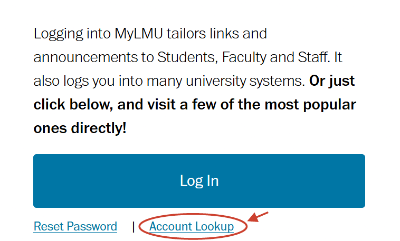
- Go to MyLMU (https://my.lmu.edu) and select Account Lookup, located below the Log In button.
- Enter your first name, last name, birth date (month and day only), and the last four digits of your University I.D. DO NOT USE your Social Security Number.
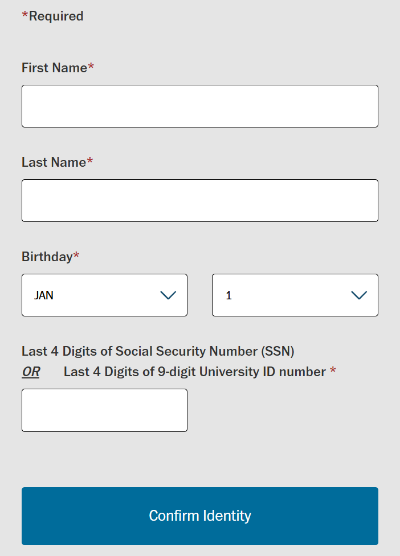
After completion, click "Confirm Identity" to view account details: LMU email, University ID, and username.
Default Password for First-Time Login
Click on “if you are a new user and need your default password, click here”
Your initial password is: Upper Case of the first initial of your last name + Lower Case of the first initial of your first name + #0000 + last 5 digits of your University ID (e.g. a person with name John Doe and University ID 912345678 would be Dj#000045678 where the 4th, 5th, 6th and 7th character are zeroes )
Log In to MyLMU
On the "More information required" page, select "Next".
For enhanced account security, set up two verification methods like alternate email and mobile phone. Passwords should be a minimum of 12 characters long.